
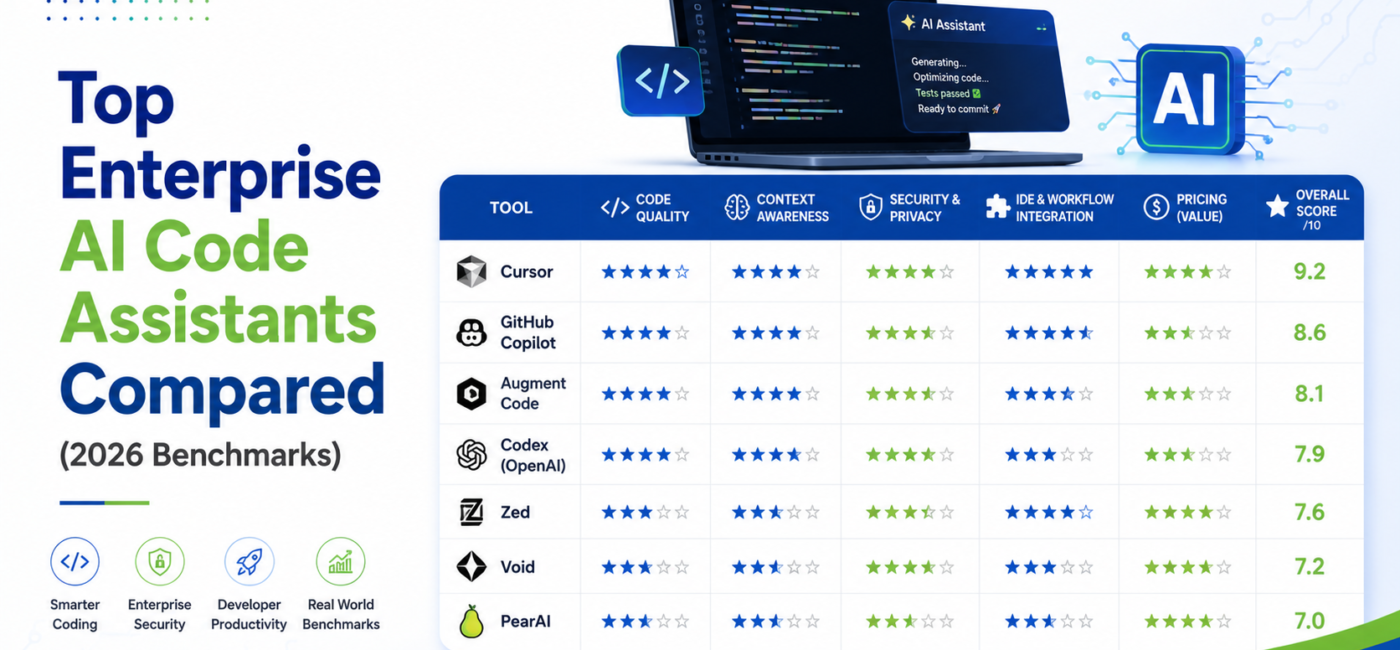
No single AI code assistant wins every category in 2026. Cursor leads on refactoring and raw agentic capability. GitHub Copilot wins on ecosystem reach and enterprise compliance. Augment Code wins when your codebase is massive and context is everything. Tabnine wins when your code legally cannot leave your building. This guide breaks down real benchmark scores, pricing and which tool actually fits your team size and industry.
Every vendor in this space claims to be the best. That’s not useful information for someone actually picking a tool for forty developers next quarter.
So let’s skip the marketing and look at what the benchmarks actually show, because the honest answer is that “best” depends entirely on what you’re optimizing for. A fintech company locked into strict data residency rules has a completely different winner than a startup doing rapid multi-file refactors all day.
Here are the seven tools enterprise teams are actually deploying in 2026, benchmarked side by side.
How Were These Assistants Benchmarked?
Enterprise AI code assistants in 2026 are typically benchmarked across five core tasks: algorithm implementation, bug fixing, refactoring, test writing and code review. Independent testing by Dev.to and other outlets scored tools out of 10 in each category using identical prompts and codebases. Cursor scored highest overall at 9.2, followed by GitHub Copilot at 8.8, with Augment, Codex, Zed, Void and PearAI filling out the rest of the field.
The benchmark data referenced throughout this piece comes from head-to-head testing across 20-plus tools on identical tasks, using the same prompts and the same test codebases for every assistant.
The Full Benchmark Scoreboard
Here’s how the top contenders scored across the five core coding tasks:
| Tool | Algorithm | Bug Fixing | Refactoring | Test Writing | Code Review | Average |
| Cursor | 9/10 | 9/10 | 10/10 | 8/10 | 8/10 | 9.2 |
| GitHub Copilot | 9/10 | 8/10 | 8/10 | 9/10 | 8/10 | 8.8 |
| Augment Code | 7/10 | 8/10 | 8/10 | 7/10 | 8/10 | 7.9 |
| Codex (OpenAI) | 8/10 | 7/10 | 8/10 | 8/10 | 6/10 | 7.8 |
| Zed | 8/10 | 7/10 | 7/10 | 8/10 | 7/10 | 8.0 |
| Void | 7/10 | 7/10 | 6/10 | 7/10 | 6/10 | 7.2 |
| PearAI | 7/10 | 7/10 | 6/10 | 7/10 | 6/10 | 7.0 |
A pattern jumps out immediately. Cursor’s biggest strength isn’t spread evenly, it’s concentrated in refactoring where it hit a perfect 10. Copilot is the most consistent performer across every category rather than dominating one. Augment doesn’t top any single column but scores well specifically on tasks where deep codebase context matters most, which tells you exactly where it’s meant to be deployed.
Best 7 Enterprise AI Code Assistants in 2026
1. Cursor: The Agentic IDE Built for Complex Refactors
Enterprise pricing: $40/user/month (Business) | Benchmark average: 9.2/10
Cursor is a full VS Code fork with AI built into the core experience rather than bolted on as a plugin. That architectural choice is why it consistently outperforms extension-based tools on multi-file operations.
Its Cmd K feature, built-in checkpoints and automatic rollback system let engineers push through large-scale transformations across a repo while keeping a real safety net if something breaks. Context window support reaches 100K tokens with full-repo awareness, well beyond what most competitors offer.
Where it falls short: Security and compliance features sit at standard encryption rather than the SOC 2 Type II or ISO 42001 certifications enterprises in regulated industries typically require.
Best fit: Teams running AI-heavy, multi-file workflows where refactoring speed and agentic depth matter more than compliance checkboxes.
“Cursor scored highest overall with an average of 9.2, with its refactoring capability being the standout result. Copilot scored an 8.8 average, with strong performance across all tasks and particularly good results in test generation and algorithm implementation.”
— Dev.to Independent Benchmark, 2026
2. GitHub Copilot: The Default Enterprise Choice
Enterprise pricing: $21-39/user/month | Benchmark average: 8.8/10
GitHub Copilot remains the most widely deployed AI coding assistant in the world, and the 2026 version is meaningfully stronger than what most developers remember from two years ago.
Its real advantage isn’t raw capability, it’s reach. Copilot integrates natively across VS Code, JetBrains, Neovim and Visual Studio, plus native GitHub Actions integration that plugs straight into CI/CD pipelines. Copilot Workspace now handles end-to-end task planning rather than just line-by-line completion.
On the compliance side, Copilot holds SOC 2 certification and deep GitHub Enterprise integration, which is exactly what most procurement teams want to see before signing off.
Best fit: Organizations with developers spread across multiple IDEs who want the lowest-friction enterprise rollout with strong compliance backing already in place.
3. Augment Code: Built for Massive Codebases
Enterprise pricing: Custom | Benchmark average: 7.9/10
Augment code doesn’t chase flashy benchmark wins. It chases context depth, and that shows in exactly where it scores well: bug fixing, refactoring and code review, the three tasks where actually understanding a sprawling codebase matters most.
It holds SOC 2 Type II and ISO 42001 certification, multi-IDE support and what’s described as massive repo support for context handling. This is the tool built specifically for teams where the codebase is the bottleneck, not the model’s raw coding skill.
Best fit: Large engineering organizations with legacy codebases running into millions of lines, where understanding cross-file dependencies matters more than flashy one-shot code generation.
4. Claude Code: The Terminal-First Agent
Pricing: $20/month (Pro) | Benchmark ranking: Best for terminal-heavy work
Claude Code takes a different approach entirely. It lives in your terminal rather than an IDE window, giving it broader system access for genuinely complex, multi-step agentic tasks.
Multiple 2026 comparisons rank it as the strongest choice specifically for terminal-heavy workflows and complex task orchestration, distinct from IDE-embedded tools that excel at inline completion.
Best fit: Engineering teams comfortable working command-line-first, who want an agent capable of running full multi-step workflows rather than just suggesting the next line.
5. Amazon Q Developer: The AWS-Native Pick
Enterprise pricing: $19/user/month | Benchmark score: 7.8/10
If your infrastructure lives on AWS, Amazon Q Developer has an advantage no competitor can replicate. Rebranded and significantly upgraded from CodeWhisperer, it comes with unmatched native knowledge of IAM policies, Lambda and CDK out of the box.
It also bakes security scanning directly into suggestions and carries strong SOC 2, HIPAA and PCI DSS compliance support, which matters enormously for regulated industries already committed to AWS.
Best fit: Teams deeply embedded in the AWS ecosystem who want an assistant that already understands their infrastructure rather than treating cloud services as an afterthought.
6. Tabnine Enterprise: Zero Data Retention for Regulated Industries
Enterprise pricing: $39-59/user/month | Benchmark score: 7.3/10
Tabnine made a deliberate trade-off: sacrifice some raw capability for radical privacy. Full on-premise deployment means code never leaves your infrastructure, with zero data transmission to external servers and no use of your code for external model training.
The benchmark numbers reflect that trade-off honestly. Tabnine’s raw capability ceiling sits below Cursor or Copilot, and on-premise setup requires real DevOps investment to stand up properly.
Best fit: Finance, healthcare and defense organizations where code leaving the building simply isn’t an option regardless of how good a competing tool’s raw output might be.
7. Codex (OpenAI): Strong in the Sandbox
Pricing: Included with ChatGPT plans | Benchmark average: 7.8/10
Codex performs best specifically on algorithm implementation and refactoring, where its ability to iterate inside a sandboxed cloud environment before returning a finished result gives it a real edge over tools that generate code inline without a test loop.
Do you know: OpenAI Codex Is Now on Your Phone
Its code review score is the weakest part of its profile at 6/10, suggesting it’s better suited to generation and iteration tasks than to catching subtle issues in someone else’s code.
Best fit: Teams that want an assistant capable of testing its own output in an isolated environment before handing back a finished implementation.
How to Pick the Right Stack for Your Team Size?
Nobody actually needs to pick just one tool. Most well-run enterprise teams in 2026 are running a primary coding assistant alongside a dedicated code review tool.dev
For teams of 5-20 developers:
- Primary coding tool: Cursor Business ($40/user/month) if AI-heavy multi-file workflows are common, or Copilot Business ($39/user/month) for lower-friction adoption across diverse IDEs
- Code review layer: CodeRabbit ($24/user/month), which consistently catches real issues with low noise and natural language configuration
For full enterprise deployment:
- Broad coverage: Copilot Enterprise for developer teams across every IDE
- Large codebases: Augment Code where deep context understanding is the bottleneck
- Regulated industries: Tabnine Enterprise for self-hosted, zero-retention requirements
- Code review at scale: CodeRabbit Enterprise or Greptile, integrated directly into CI/CD
Monthly Cost Comparison for a Team of 10
Here’s what the math actually looks like once you scale a decision beyond a single seat:
| Tool | Monthly Cost (10 devs) | Key Capability |
| Codeium Free | $0 | Unlimited autocomplete |
| GitHub Copilot Pro | $100 | Coding Agent + multi-model |
| Amazon Q Developer Pro | $190 | AWS-native + security scans |
| GitHub Copilot Business | $190 | SSO + audit + policy controls |
| Cursor Pro | $200 | Advanced agentic IDE |
| Tabnine Enterprise | $590 | On-premise + zero retention |
The gap between Copilot Pro at $100 and Tabnine Enterprise at $590 isn’t really about capability. It’s about what your compliance team will actually sign off on. That $490 difference buys you the ability to say “our code never touches an external server” in an audit, which for some industries is worth every dollar of the premium.
Frequently Asked Questions
Which AI code assistant scored highest in 2026 benchmarks?
Cursor scored highest overall at 9.2 out of 10, driven primarily by a perfect 10/10 score on refactoring tasks across large, multi-file codebases.
Is GitHub Copilot still worth it for enterprise teams in 2026?
Yes. Copilot scored 8.8 overall and offers the deepest IDE coverage and strongest compliance certifications, making it the lowest-friction enterprise rollout option.
What is the best AI code assistant for regulated industries?
Tabnine Enterprise, due to full on-premise deployment and zero data retention. It scored lower on raw capability but is the standard choice for finance and healthcare.
Which AI coding tool works best for large legacy codebases?
Augment Code, built specifically for deep context understanding across massive repositories, scoring strongest on bug fixing, refactoring and code review tasks.
Is Amazon Q Developer only useful for AWS-based teams?
It works for any team but its real advantage is native AWS knowledge including IAM, Lambda and CDK, making it disproportionately valuable for AWS-heavy infrastructure.
How much does an enterprise AI coding assistant typically cost?
Pricing ranges from free tiers up to $59 per user monthly for premium enterprise plans like Tabnine, with most mid-tier tools like Copilot and Cursor between $20 and $40.
Should teams use one AI code assistant or multiple tools together?
Most enterprise teams pair a primary coding assistant like Cursor or Copilot with a dedicated code review tool like CodeRabbit for better coverage across the full workflow.
What is the weakest area for most AI code assistants right now?
Code review consistently scores lowest across the benchmarked tools, with most assistants performing better at generation and refactoring than at catching subtle logic issues.
Does Claude Code work well for enterprise teams?
Yes, particularly for terminal-heavy and complex multi-step agentic workflows, though it suits teams comfortable working command-line-first rather than inside a traditional IDE.
Which AI code assistant is best for startups on a tight budget?
Codeium’s free tier offers unlimited autocomplete at no cost, while GitHub Copilot Pro at $10 per month per developer delivers strong capability at the lowest paid tier.
Conclusion
There’s no universal winner here, and any article claiming otherwise is oversimplifying. Cursor wins on raw agentic capability, Copilot wins on reach and compliance, Augment wins on context depth and Tabnine wins on privacy. Pick based on your codebase size, your compliance requirements and your team’s existing tooling, not based on whichever benchmark number is highest.
Disclaimer:
This article is based on publicly available benchmark data and comparison reports from Dev.to, TechnovaPartners, Exceeds AI, Daily.dev, Hivel and Faros AI as of July 2026. Benchmark scores, pricing and feature availability may change as vendors update their products. This article is for informational purposes only and does not constitute a purchasing recommendation for any specific organization.
