
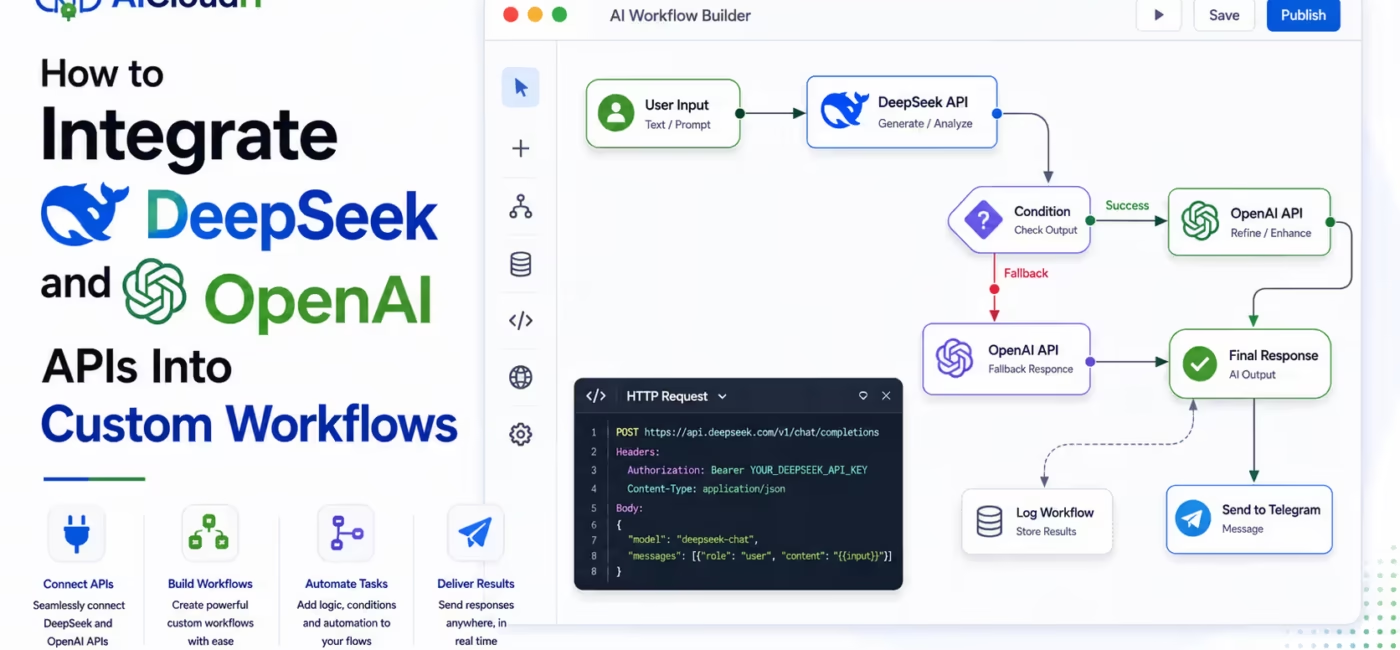
DeepSeek’s API is OpenAI-compatible, so you can reuse the official OpenAI SDK by changing the base URL and API key. The practical pattern is one client interface, two providers and a router that picks DeepSeek for cost-sensitive bulk work and OpenAI for higher-stakes tasks. Build retry logic, fallbacks, logging and secret management from day one or the integration will break the first time traffic spikes.
Most teams overcomplicate this.
They treat DeepSeek and OpenAI like two completely different systems. In practice, DeepSeek speaks the same Chat Completions format OpenAI popularized. That means you can keep one code path and switch providers with configuration instead of rewriting the whole app.
Here’s how to do it properly.
Why Can You Use One SDK for Both APIs?
DeepSeek’s API is OpenAI-compatible. Developers can use the official OpenAI Python or Node SDK by setting the base URL to https://api.deepseek.com or https://api.deepseek.com/v1, authenticating with a DeepSeek API key and passing a DeepSeek model name such as deepseek-v4-flash or deepseek-v4-pro.
DeepSeek documents this clearly. Change the configuration and the same SDK or OpenAI-compatible software can call DeepSeek.
| Provider | Base URL | Auth | Typical Models |
| OpenAI | https://api.openai.com/v1 | OpenAI API key | GPT family models |
| DeepSeek | https://api.deepseek.com or /v1 | DeepSeek API key | deepseek-v4-flash, deepseek-v4-pro |
DeepSeek also exposes an Anthropic-compatible endpoint at https://api.deepseek.com/anthropic if your stack already uses Anthropic SDKs or tools.
That compatibility is the whole reason dual-provider workflows are practical.
Do you know: How to Prepare Data for ML APIs on Google Challenge Lab?
What Do You Need Before Writing Any Code?
Get the basics in place first.
- An OpenAI API key from the OpenAI platform.
- A DeepSeek API key from the DeepSeek platform.
- The official openai package for Python or Node.
- Environment variables for both keys. Never hardcode secrets.
- A clear list of tasks in your workflow: classification, summarization, drafting, extraction, reasoning, tool calling.
If you skip the task map, you’ll end up sending every request to one model and wondering why costs or quality look wrong.
How Do You Create OpenAI and DeepSeek Clients?
Use two clients that share the same interface.
Python example
import os

from openai import OpenAI

openai_client = OpenAI(

    api_key=os.environ["OPENAI_API_KEY"],

    base_url="https://api.openai.com/v1",

)

deepseek_client = OpenAI(

    api_key=os.environ["DEEPSEEK_API_KEY"],

    base_url="https://api.deepseek.com",  # or https://api.deepseek.com/v1

)

def chat(client, model, messages, **kwargs):

    return client.chat.completions.create(

        model=model,

        messages=messages,

        **kwargs,

    )
What this gives you
- One function signature for both providers.
- Easy provider switching at runtime.
- Less duplicated request logic.
For DeepSeek, common model choices are:
- deepseek-v4-flash for speed and lower cost.
- deepseek-v4-pro for stronger reasoning and agentic work.
Current DeepSeek docs also note large context windows on V4 models, which matters for long documents and multi-step workflows.
How Should You Route Tasks Between DeepSeek and OpenAI?
This is where most integrations actually win or lose.
Don’t pick a provider once and forget it. Route by task type.
| Workflow Task | Better Default | Why |
| High-volume classification | DeepSeek Flash | Lower unit cost at scale |
| Bulk summarization | DeepSeek Flash | Fast enough for queues and batch jobs |
| Customer-facing writing | OpenAI or DeepSeek Pro | Quality and tone matter more |
| Complex reasoning | DeepSeek Pro or OpenAI flagship | Harder multi-step logic |
| Tool calling / agents | Test both | Depends on tool schema support and reliability |
| Compliance-sensitive output | OpenAI or tightly logged private path | Audit and policy requirements vary |
A simple router looks like this:
def pick_provider(task_type: str):

    if task_type in {"classify", "extract", "summarize_bulk"}:

        return deepseek_client, "deepseek-v4-flash"

    if task_type in {"reason", "plan", "agent"}:

        return deepseek_client, "deepseek-v4-pro"

    return openai_client, "gpt-4.1"  # replace with your current OpenAI model
The point isn’t that one model always wins. The point is that your workflow should decide based on cost, latency and risk.
Also check the recent version from Deepseek:
How Do You Build a Real Workflow Instead of a Demo Script?
A custom workflow usually has five stages:
- Intake – receive a ticket, document, form or event.
- Preprocess – clean text, chunk content, attach metadata.
- Model call – send the right prompt to the right provider.
- Postprocess – validate JSON, score confidence, enforce schema.
- Action – write to CRM, queue a human review, send an email or trigger another agent.
Here’s a practical pattern:
from typing import Literal

Task = Literal["classify", "summarize_bulk", "draft", "reason"]

def run_step(task: Task, user_input: str):

    client, model = pick_provider(task)

    messages = [

        {"role": "system", "content": system_prompt_for(task)},

        {"role": "user", "content": user_input},

    ]

    try:

        result = chat(client, model, messages, temperature=0.2)

        text = result.choices[0].message.content

        return {"ok": True, "provider_model": model, "output": text}

    except Exception as exc:

        # fallback to OpenAI if DeepSeek fails, or the reverse

        fallback = chat(

            openai_client,

            "gpt-4.1",

            messages,

            temperature=0.2,

        )

        return {

            "ok": True,

            "provider_model": "gpt-4.1",

            "output": fallback.choices[0].message.content,

            "fallback_from": str(exc),

        }
Fallbacks matter more than people admit. APIs time out. Rate limits hit. Models change behavior. A workflow without failover is a demo, not production.
Also check the: How to Get DeepSeek to Work with Cursor Agent Mode?
How Do You Handle Streaming, Tools and Long Context?
Streaming
Both providers can work through OpenAI-style chat completion clients. If your UI needs token-by-token output, enable streaming in the request and pass chunks straight to the client. Keep one streaming adapter so DeepSeek and OpenAI emit the same internal event format.
Tool calling
If your workflow uses functions or tools, standardize the tool schema first. Then test the exact same tools against both providers before you route live traffic. Compatibility at the HTTP layer does not guarantee identical tool-calling behavior in every edge case.
Long documents
DeepSeek V4 models are documented with very large context windows, which helps when the workflow needs whole-file analysis instead of aggressive chunking. Still chunk when you can. Smaller inputs are cheaper, easier to cache and easier to debug.
How Do You Keep Costs and Reliability Under Control?
This is the unsexy part that saves you later.
- Cache repeated prompts and retrieval results. Don’t pay twice for the same classification.
- Set max tokens deliberately. Blind defaults waste money.
- Log provider, model, latency, token usage and outcome. You need this to compare DeepSeek and OpenAI honestly.
- Use retries with jitter for 429 and 5xx responses.
- Cap fan-out. Agent loops can multiply API calls fast.
- Separate batch and real-time queues. Bulk DeepSeek jobs shouldn’t compete with customer-facing OpenAI calls.
A thin gateway helps. Some teams route DeepSeek through gateways such as Cloudflare AI Gateway for observability and control, while keeping the same app-level interface.
What Does a Clean Architecture Look Like?
Use layers:
| Layer | Responsibility |
| Workflow engine | Business steps, branching, human review |
| Model router | Chooses OpenAI vs DeepSeek vs fallback |
| Provider adapters | Translate one internal request format to each API |
| Policy layer | PII redaction, allowlists, output validation |
| Observability | Traces, token costs, error rates, prompt versions |
That structure lets you change models without rewriting every automation.
If you’re on cloud platforms, DeepSeek is also available through OpenAI-compatible endpoints on some hosts, including Alibaba Cloud Model Studio compatible-mode URLs. Useful when data residency or vendor consolidation matters.
Common Integration Mistakes
- Hardcoding one model name all over the codebase.
- Forgetting different keys for each provider.
- Assuming identical quality on every task without evals.
- No JSON schema validation after the model responds.
- No fallback when the primary provider fails.
- Mixing interactive and batch traffic on one rate limit pool.
- Logging raw prompts that contain secrets or customer PII.
Most people miss the eval step. Before you “save money” by moving 80% of traffic to DeepSeek, run a side-by-side test on real examples from your workflow.
Also know: How Many Images Can You Upload to DeepSeek
Frequently Asked Questions
Is the DeepSeek API compatible with OpenAI?
Yes. DeepSeek supports OpenAI-compatible Chat Completions, so many apps only need a new base URL, API key and model name.
Do I need a special DeepSeek SDK?
No. The official OpenAI SDK works when pointed at DeepSeek’s base URL.
What base URL should I use for DeepSeek?
Use https://api.deepseek.com or https://api.deepseek.com/v1 depending on your client. Both appear in current integration guides.
Which DeepSeek model should I use in workflows?
Use deepseek-v4-flash for fast low-cost tasks and deepseek-v4-pro for harder reasoning or agent-style work.
Can I use DeepSeek and OpenAI in the same application?
Yes. Create two clients and route each step by cost, latency and quality needs.
How do I implement failover between providers?
Catch provider errors, then retry the same normalized request on the secondary client. Log every fallback.
Can I stream responses from both APIs?
Yes, through OpenAI-style streaming chat completions if your client and chosen model support it.
Is DeepSeek available through cloud gateways?
Yes. Examples include Cloudflare AI Gateway routing and Alibaba Cloud OpenAI-compatible endpoints.
Should every workflow step use the same model?
No. Route bulk extraction to cheaper models and reserve stronger models for high-risk or customer-facing steps.
What’s the fastest way to prototype a dual-provider workflow?
Wrap both clients in one function, store keys in environment variables and run the same prompt suite through both models before adding business logic.
Conclusion
Integrating DeepSeek and OpenAI is less about exotic architecture and more about clean interfaces. Use one SDK pattern, two credentials, a task-aware router and hard production controls around retries, validation and logging. Start with a few real workflow steps, measure quality and cost side by side, then shift traffic gradually. That’s how you get the savings without wrecking reliability.
Disclaimer:
This article is based on publicly available DeepSeek and OpenAI-compatible API documentation and developer guides as of August 13, 2026. Model names, endpoints, pricing and feature support can change. Confirm current docs and test thoroughly before production use.
