
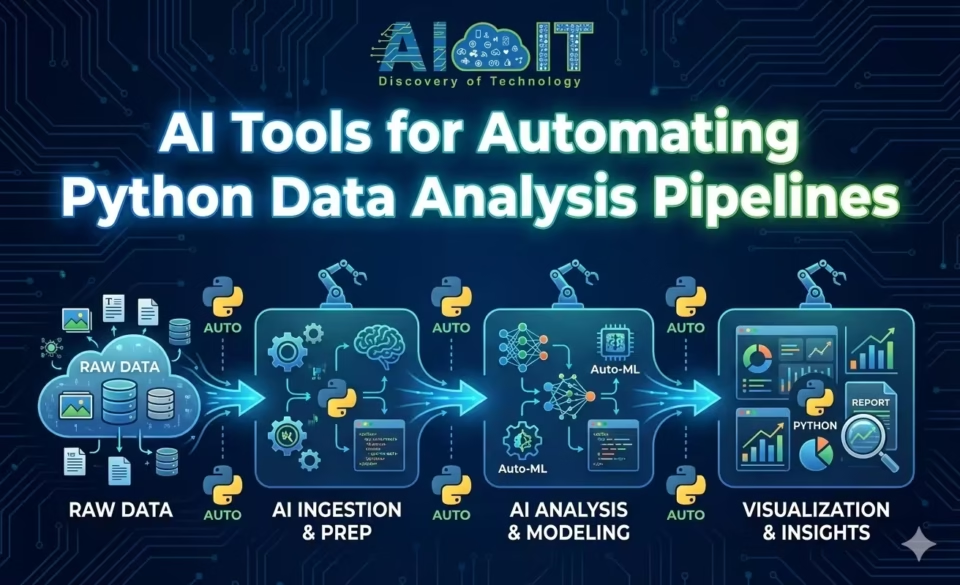
Python has long been the go-to language for data analysis, but let’s be honest: building and maintaining data pipelines can be tedious, time-consuming, and error-prone. Enter AI-powered automation tools that are fundamentally changing how data professionals approach pipeline development. These intelligent systems don’t just execute repetitive tasks; they actually understand context, suggest optimizations, and generate code that would take hours to write manually. Whether you’re a data scientist drowning in ETL workflows or a business analyst looking to streamline repetitive analysis tasks, understanding how AI tools for automating Python data analysis pipelines work has become essential in 2026.
In this comprehensive guide, you’ll discover what Python data analysis pipelines are and why automation matters, how AI is transforming traditional workflows compared to rule-based automation, the major categories of AI tools available for pipeline automation, popular specific tools and platforms currently leading the market, a practical step-by-step example of automating a real pipeline with AI, how to choose the right tool for your specific needs, limitations and challenges you should anticipate, and where this technology is heading in the near future.
What Is a Python Data Analysis Pipeline?
A Python data analysis pipeline is essentially a structured workflow that moves data through multiple stages, from raw collection to actionable insights. Think of it like an assembly line for data: each station performs a specific transformation until you end up with clean, analyzed, and visualized results ready for decision-making.
The classic pipeline follows an ETL (Extract, Transform, Load) pattern, though modern approaches sometimes flip this to ELT (Extract, Load, Transform) depending on where processing happens.
- Extraction pulls data from various sources like APIs, databases, CSV files, web scraping, or streaming platforms.
- Transformation cleans the messy reality of raw data by handling missing values, standardizing formats, merging datasets, creating derived features, and performing calculations or aggregations.
- Loading pushes the processed data into destination systems such as data warehouses, visualization tools, or machine learning platforms.
But data analysis pipelines go beyond just ETL. Common pipeline stages include data ingestion (getting data into your system), data validation (ensuring quality and consistency), exploratory analysis (understanding patterns and distributions), feature engineering (creating variables for modeling), statistical analysis or machine learning (extracting insights), visualization (creating charts and dashboards), and reporting (delivering findings to stakeholders).
Do you know: How to Prepare Data for ML APIs on Google Challenge Lab
Why Automation Matters in Data Analysis?
Manual workflows are where data projects go to die. Seriously. When you’re copying code between notebooks, manually running scripts in sequence, and hoping you remembered to update that one parameter, you’re setting yourself up for failure.
- Time savings are the obvious benefit. What takes hours manually can run in minutes automatically. But the deeper value is in reduced human error. When you automate, you eliminate the “oops, I forgot to filter out test data” moments that corrupt analyses. Every execution follows the exact same logic, producing consistent results.
- Reproducibility becomes trivial with automation. Someone can re-run your entire analysis six months later and get identical results (assuming the source data hasn’t changed). This is critical for scientific research, regulatory compliance, and debugging when something goes wrong.
- Scalability transforms from nightmare to non-issue. Manually processing 100 files? Annoying but doable. Processing 10,000? Impossible without automation. Automated pipelines scale horizontally without additional human effort.
- Collaboration improves dramatically because everyone works with the same pipeline definitions rather than individual scripts scattered across personal folders. Version control actually works when your pipeline is code rather than “analysis_final_v3_REAL_THIS_TIME.ipynb”.
How AI Is Changing Python Data Analysis Workflows?
Traditional automation executes predefined rules: if condition X, then action Y. AI-powered automation actually makes decisions based on context, learns patterns, and adapts to new situations.
- AI-assisted coding has revolutionized how we write pipeline code. Tools like Jupyter AI and GitHub Copilot generate entire functions from natural language descriptions. You describe what you want (“load this CSV, remove outliers beyond 3 standard deviations, and create a normalized version”), and AI produces the actual Python code. This isn’t just autocomplete on steroids; it’s contextual understanding of data operations.
- Natural language to code interfaces lower the barrier to entry dramatically. Non-programmers can now describe analyses in plain English and get executable Python code. “Show me monthly sales trends with a 3-month moving average” becomes a valid way to build pipeline stages.
- Intelligent data cleaning goes beyond simple rules. AI systems can detect anomalies using machine learning, suggest appropriate imputation strategies based on data distributions, identify and fix structural issues automatically, and even recognize when outliers are legitimate rather than errors. Traditional scripts might replace missing values with the mean; AI tools analyze patterns to determine if forward-fill, interpolation, or domain-specific rules make more sense.
AI vs Traditional Automation Tools
The difference between rule-based orchestration and AI-driven decision-making is profound.
- Traditional automation tools like Apache Airflow, Prefect, or Luigi excel at scheduling, dependency management, and workflow orchestration. They execute tasks in the right order, retry on failure, and send alerts. But they don’t understand your data or suggest improvements. You define every decision point explicitly.
- AI-powered tools add a layer of intelligence. They can automatically determine optimal data types, suggest feature engineering transformations, detect when pipeline logic might fail on new data, generate documentation explaining what each stage does, and even refactor code for better performance.
- Flexibility and adaptability differ substantially. Traditional tools follow rigid logic: “run task B after task A completes successfully.” AI tools can adapt: “this data looks different from historical patterns; should we apply additional validation?”.
- The learning curve also varies. Traditional orchestration requires understanding DAGs (Directed Acyclic Graphs), task dependencies, and Python programming. AI tools with natural language interfaces can be used productively with minimal coding knowledge, though you’ll hit limitations without understanding what the generated code actually does.
Check the comparison of: Agentic AI vs Generative AI vs Traditional AI
Categories of AI Tools for Automating Python Data Analysis Pipelines
The ecosystem of AI tools for automating Python data analysis pipelines spans multiple categories, each addressing different pipeline stages and user needs.
AI Coding Assistants for Python
These tools integrate directly into your development environment to assist with writing pipeline code.
- Auto-generating Python scripts from descriptions is their core capability. You provide requirements, they produce code. Jupyter AI, for instance, can generate entire data analysis workflows inside notebooks based on conversational prompts. GitHub Copilot suggests complete functions as you type, understanding context from your existing code.
- Refactoring and optimization happens intelligently. AI assistants can take your working-but-messy code and restructure it for better performance, readability, or maintainability. They might vectorize loops, suggest more efficient pandas operations, or identify redundant calculations.
- Inline explanations and debugging help when you inherit code or return to your own work months later. Ask “what does this function do?” and get plain-English explanations. Hit an error, and AI tools can suggest fixes based on the exception type and code context.
AI-Powered Data Preparation Tools
Data preparation typically consumes 60-80% of analysis time. AI tools targeting this bottleneck deliver massive value.
- Automated data cleaning uses machine learning to detect and correct issues. Instead of writing dozens of if-statements to handle edge cases, AI systems learn patterns from your data and apply appropriate fixes. They handle missing values through intelligent imputation strategies, detect and correct data type mismatches, identify duplicate records even when not exact matches, and standardize inconsistent formatting.
- Schema detection and anomaly detection happen automatically. Upload a new CSV, and AI tools infer column types, relationships, and potential issues without manual inspection. They flag anomalies that rule-based systems would miss because they understand statistical distributions and domain patterns.
- Feature suggestion accelerates the modeling process. AI tools analyze your dataset and recommend engineered features that might improve model performance, such as date-based features from timestamps, interaction terms between variables, or polynomial transformations.
Pipeline Orchestration and Automation Platforms
Once individual stages work, you need orchestration to tie everything together.
- Scheduling and dependency management ensure tasks run in the correct order at the right times. Modern platforms like Apache Airflow, Prefect, and Dagster handle complex dependencies where task C waits for both task A and task B to complete before executing. They support dynamic pipeline generation where the structure adapts based on runtime conditions.
- Integration with Python notebooks and scripts matters because analysts often develop in Jupyter. The best platforms can execute notebook cells as pipeline tasks, passing data between stages seamlessly.
- Monitoring and failure handling prevent 3 AM panic calls. Automated alerting notifies relevant people when pipelines fail. Retry logic attempts to recover from transient errors. Logging captures enough detail to diagnose issues without drowning in noise.
Popular AI Tools Used in Python Data Analysis Pipelines
Let’s look at specific tools and platforms that data professionals actually use in production environments.
Notebook-Based AI Tools
- Jupyter AI brings conversational AI assistance directly into Jupyter notebooks. You can chat with the assistant using natural language, asking for code generation, data analysis, visualizations, or explanations. The AI has access to variables in your current Python session, making it context-aware and surprisingly effective. You describe what you want, review the generated code, and execute it if satisfied.
- MLJAR Studio offers a Python notebook environment with integrated ChatGPT-powered assistance. It combines the familiar notebook interface with AI code generation, making data analysis accessible to less technical users while still allowing customization for experts.
Code generation and explanation features help both beginners and experts. Beginners get working code without deep Python knowledge; experts accelerate tedious tasks and get quick explanations of unfamiliar code patterns.
Experiment tracking capabilities in these tools help manage the iterative nature of data analysis. Some automatically log parameters, results, and code versions as you experiment, creating reproducible records without manual effort.
End-to-End AI Data Platforms
- Airbyte has become popular for Python ETL workflows, offering extensive connector libraries and automation capabilities. While not purely AI-based, it reduces the coding burden dramatically by handling scalability, monitoring, and efficiency concerns that would require significant custom development.
- Informatica incorporates AI-driven automation for faster data mapping, transformation, and orchestration. Its AI capabilities include intelligent schema mapping suggestions, anomaly detection in data quality, and predictive failure prevention.
- Hevo Data provides real-time data ingestion from 150+ sources with automated schema detection and mapping. The platform’s AI components handle schema drift automatically, adapting pipelines as source data structures change without manual intervention.
These platforms offer low-code / no-code pipeline automation where you configure rather than code. Drag-and-drop interfaces define data flows, while the platform generates and executes the underlying Python or SQL logic.
Python extensibility remains crucial even in low-code platforms. When pre-built components don’t cover edge cases, you can inject custom Python transformations. The best platforms balance ease-of-use with flexibility for complex requirements.
Deployment and scaling capabilities distinguish enterprise platforms from hobbyist tools. Production-grade platforms handle distributed execution, automatic scaling based on data volume, monitoring and alerting, and security and compliance requirements.
Comparison: AI Tool Categories vs Use Cases
| Tool Category | Best For | Skill Level Required | Example Use Cases |
| AI Coding Assistants (Jupyter AI, Copilot) | Accelerating code writing, learning new libraries | Intermediate to Advanced Python | Generating transformation functions, explaining unfamiliar code, debugging errors |
| AI Data Preparation Tools | Cleaning messy datasets, feature engineering | Beginner to Intermediate | Handling missing values, detecting anomalies, suggesting derived features |
| Low-Code AI Platforms (Hevo, Informatica) | Non-technical users, rapid deployment | Beginner | Connecting data sources, basic ETL without coding |
| Orchestration Platforms (Airflow + AI) | Complex multi-stage pipelines, production systems | Intermediate to Advanced | Scheduling dependencies, monitoring, retry logic |
Example: Automating a Python Data Analysis Pipeline with AI
Let me walk you through a practical example of building an automated sales analysis pipeline using AI tools.
Stage 1: Data Extraction
You need to pull sales data from three sources: a PostgreSQL database, a REST API, and CSV files in an S3 bucket. Using Jupyter AI, you describe: “Extract sales data from PostgreSQL table ‘transactions’, fetch customer data from the CRM API endpoint, and load product data from S3 bucket ‘sales-data/products/'”.
The AI generates extraction code using pandas, requests library for API calls, and boto3 for S3 access. It includes error handling and connection management you’d otherwise spend time looking up.
Stage 2: Data Validation and Cleaning
Next, you ask the AI: “Check for missing values in critical columns, remove duplicate transaction IDs, and flag outliers in sales amounts”. The AI generates code using scikit-learn’s imputation strategies, identifies appropriate outlier detection methods based on your data distribution, and creates validation reports showing data quality issues.
Stage 3: Transformation and Feature Engineering
For this stage: “Merge the three datasets on customer and product IDs, calculate monthly sales trends, and create features for day-of-week and seasonal patterns”. The AI produces pandas merge operations with appropriate join types, groupby aggregations for trend calculation, and datetime feature extraction.
Stage 4: Analysis and Visualization
Finally: “Perform regression analysis to identify factors affecting sales, and create a dashboard with sales trends, top products, and regional breakdown”. The AI generates statsmodels or scikit-learn code for regression, matplotlib or plotly code for visualizations, and even suggests which chart types suit each insight.
Stage 5: Orchestration
To automate the entire pipeline, you use Apache Airflow with the AI-generated code organized as tasks. The AI can even generate the DAG definition: “Create an Airflow DAG that runs this pipeline daily at 6 AM, with email alerts on failure”.
The complete pipeline runs automatically, handling errors gracefully and producing consistent results without manual intervention.
How to Choose the Right AI Tool for Your Python Workflow?
Not all AI tools suit every scenario. Here’s how to match tools to your specific needs.
Skill level matters enormously. If you’re a Python expert, coding assistants like GitHub Copilot or Jupyter AI accelerate what you already know how to do. If you’re a business analyst with limited programming experience, platforms with natural language interfaces and no-code options like MLJAR Studio or Hevo Data might be better fits.
Data size and complexity influence tool selection. For datasets under a few gigabytes with straightforward transformations, notebook-based AI tools handle everything. For massive datasets requiring distributed processing, you need enterprise platforms with scalability built in. Complex multi-source pipelines benefit from dedicated orchestration platforms like Airflow or Prefect, possibly enhanced with AI-generated code.
Cloud vs local execution affects both cost and capabilities. Cloud-based platforms offer unlimited scalability and managed infrastructure but charge for compute resources and data transfer. Local execution gives you complete control and avoids cloud costs but limits scalability to your hardware. Many organizations use hybrid approaches: develop locally, deploy to cloud.
Common Pitfalls to Avoid
- Over-automation is real. Don’t automate processes you don’t fully understand. If you can’t explain what your pipeline should do and why, automating it just makes bad logic run faster. Start with manual analysis, understand the domain and data, then automate once the logic is proven.
- Black-box AI risks emerge when you trust generated code without understanding it. AI tools occasionally produce code that works on sample data but fails in edge cases. Always review generated code critically. Test thoroughly with diverse inputs. Understand at least the high-level logic even if specific syntax details are new.
- Integration challenges frustrate teams who assume AI tools will seamlessly plug into existing infrastructure. Legacy databases might require special connection handling. Security policies might restrict API access. Data formats might be non-standard. Budget time for integration work beyond just the AI tool itself.
Limitations and Challenges of AI-Driven Data Pipeline Automation
Despite impressive capabilities, AI-driven pipeline automation has real constraints you should understand.
- Data quality dependence is fundamental. AI tools work brilliantly on clean, well-structured data. Throw them severely corrupted data with inconsistent schemas, undocumented quirks, and they struggle just like humans do (maybe worse). Garbage in, garbage out remains true regardless of how smart your automation is.
- Debugging AI-generated pipelines presents unique challenges. When you write code yourself, you understand its logic and can trace issues. When AI generates code, you might face hundreds of lines you didn’t write and don’t immediately understand. Errors in AI-generated code can be subtle, like using inappropriate statistical methods or making incorrect assumptions about data distributions.
- Security and compliance concerns multiply with AI tools. Some AI assistants send your code to external APIs for processing, potentially exposing sensitive data or proprietary logic. Compliance frameworks like GDPR, HIPAA, or SOX might restrict which tools you can use. Always verify that AI tools meet your organization’s security and privacy requirements before adoption.
Also Find about the: Data Annotation: Tools, Types, and Use Cases
The Future of AI in Python Data Analysis Pipelines
Where is this technology heading? Several trends are emerging that will reshape how we build and maintain data pipelines.
- Autonomous analytics represents the next frontier. Imagine pipelines that don’t just execute predefined analyses but actually identify interesting patterns on their own and investigate them. “Sales dropped 15% in the Northeast region last week; should I drill down into product categories to identify the cause?” could become an automated decision rather than a human-initiated investigation.
- Agent-based pipeline orchestration moves beyond simple task sequencing. AI agents could negotiate resources, adapt to infrastructure constraints, optimize execution plans based on current system load, and coordinate with other pipelines for shared resources. Think of it as turning your pipeline from a rigid assembly line into a team of intelligent workers who coordinate dynamically.
- Human-in-the-loop workflows will likely dominate for the foreseeable future. Rather than fully autonomous systems, we’ll see AI handling routine decisions while flagging complex or high-stakes choices for human review. This balances efficiency with oversight, automation with accountability.
FAQ: Common Questions About AI Tools for Automating Python Data Analysis Pipelines
AI tools for Python data analysis are software platforms that use artificial intelligence to assist with or automate tasks in data pipelines, including code generation, data cleaning, feature engineering, and workflow orchestration. They range from coding assistants integrated into notebooks to end-to-end platforms handling entire ETL processes.
AI can automate many pipeline components, but full automation without human oversight is rarely advisable. AI excels at routine tasks like data cleaning, transformation, and visualization generation, but complex decisions about analysis methodology, statistical assumptions, and business interpretation still benefit from human judgment.
AI-generated pipelines can be highly reliable when properly validated and tested. However, they require human review to catch edge cases, verify statistical appropriateness, and ensure business logic correctness. Think of AI-generated code as a first draft that needs review, not a finished product.
Basic Python knowledge remains valuable even with AI tools. You need enough understanding to review generated code, debug issues, and customize solutions for edge cases. However, AI tools significantly lower the expertise threshold, making data pipeline development accessible to analysts with limited programming backgrounds.
Disclaimer: This article provides educational guidance on AI tools for data pipeline automation. Tool capabilities evolve rapidly; verify current features and limitations before making technology decisions for production systems.
